-
- 카카오톡 사용자가 입력할 수 있는 내용은 다음과 같습니다. 이 콘텐츠를 기반으로 수업을 만듭니다. 클래스 이름은 user로 통일해야 합니다.다음 설명을 읽고 나만의 클래스를 만드세요.
이름
전화번호
이메일
닉네임
프로필이미지
배경이미지
친구목록
즐겨찾기 목록- 이름 전화번호 이메일 닉네임 프로필 사진 배경화면 친구 목록 즐겨찾기 목록
- 현재 사용할 수 없는 데이터는 다음과 같습니다.
- 닉네임이 없어야 합니다.
- 프로필 사진이 없을 수 있습니다.
- 배경 이미지가 없을 수 있습니다.
화살
class User {
  String name;
  String phone;
  String email;
  String? nickName;
  String? profileImg;
  String? backGroundImg;
  List friends;
  List bookmark;

  User(
      {required this.name,    //필수 속성값 required
      required this.phone,
      required this.email,
      this.nickName,          //null일 수도...
      this.profileImg,
      this.backGroundImg,
      required this.friends,
      required this.bookmark});
}


void main() {
var user = User(
name: '신승호',
phone: '01036758620',
email: '[email protected]',
friends:('강아지','고양이'),
bookmark:('즐겨','찾기'));
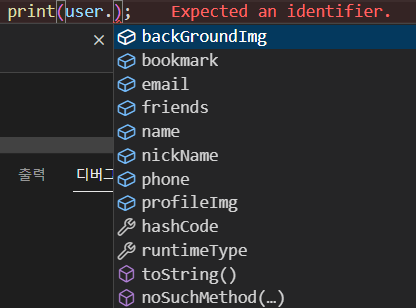
print(user.name);
}
누르다

2.다음은 UserData라는 클래스를 생성한 예이다. 다음 코드를 보고 생성자를 완성하십시오.
void main(List<String> arguments) {
	UserData userData = UserData(
		id: "id",
		birth: DateTime.now(),
		email:"[email protected]",
		lastLoginDate: DateTime.now(),
		name: "스나이퍼",
		phoneNumber: '01023456789'
	);
}
화살
class UserData {
  String id;
  DateTime birth;
  String email;
  DateTime lastLoginDate;
  String name;
  String phoneNumber;

  UserData({
    required this.id,
    required this.birth,
    required this.email,
    required this.lastLoginDate,
    required this.name,
    required this.phoneNumber,
  });
}

void main(List<String> arguments) {
  UserData userData = UserData(
      id: "id",
      birth: DateTime.now(),
      email: "[email protected]",
      lastLoginDate: DateTime.now(),
      name: "스나이퍼",
      phoneNumber: '01023456789');
  print(userData.id);
}삼.개발 목적으로 테스트 데이터가 필요할 때가 있습니다. 다음과 같이 더미 데이터로 클래스 생성자를 만듭니다.

class UserData {
  String id;
  DateTime birth;
  String email;
  DateTime lastLoginDate;
  String name;
  String phoneNumber;

  UserData({
    required this.id,
    required this.birth,
    required this.email,
    required this.lastLoginDate,
    required this.name,
    required this.phoneNumber,
  });

  UserData.dummy()
      : id = "Dummy",
        name = "더미데이터",
        birth = DateTime.now(),
        phoneNumber="010",
        email = "[email protected]",
        lastLoginDate = DateTime.now();
}

void main(List<String> arguments) {
  print('id: ${UserData.dummy().id}');
  print('name: ${UserData.dummy().name}');
  print('birth: ${UserData.dummy().birth}');
  print('phoneNumber: ${UserData.dummy().phoneNumber}');
  print('email: ${UserData.dummy().email}');
  print('lastLoginDate: ${UserData.dummy().lastLoginDate}');
}

4. 해당 클래스 게터와 세터를 연구하고 다음 결과를 얻습니다. 이 시점에서 게터가 멤버 변수와 어떻게 다른지 설명합니다.
개체 지향 프로그래밍에서 개체의 데이터는 개체 외부에서 직접 액세스할 수 없습니다.
외부에서 객체 데이터를 읽어 수정하면 객체의 무결성이 깨지기 때문이다.
따라서 객체 지향 프로그래밍은 메서드를 통해 데이터를 조작하는 것을 선호합니다.
외부로부터의 데이터 접근을 차단하고 방법을 공개 메서드를 통해 데이터에 대한 외부 액세스 촉진.
메서드는 매개변수 값의 유효성을 검사하고 유효한 값만 데이터로 저장할 수 있기 때문입니다. 그러한 역할을 하는 한 가지 방법은 setter입니다.
외부에서 개체 데이터를 읽을 때 메서드를 사용하는 것도 의미가 있습니다.
오브젝트 외부에서 오브젝트 필드 값을 사용하는 것이 적절하지 않은 경우에는 필드 값을 메소드로 처리하여 외부로 전달하십시오. 그러한 역할을 하는 한 가지 방법은 getter입니다. 클래스를 선언할 때 private로 선언하여 외부로부터 보호(_underscore 내부에서만 사용)필드에 setter/getter 메소드를 작성하여 필드 값을 안전하게 변경/사용하는 것이 좋습니다.
필드 유형이 부울인 경우 getter가 “get”이 아닌 “is”로 시작하는 것이 일반적입니다.
class UserData {
  String id;
  DateTime birth;
  String email;
  DateTime lastLoginDate;
  String name;
  String phoneNumber;
  int _age;

  get getAge {
    return this._age;
  }

  set setAge(value) {
    if (value > 0 && value < 150) {
      _age = value;
    }
  }

  UserData({
    required this.id,
    required this.birth,
    required this.email,
    required this.lastLoginDate,
    required this.name,
    required this.phoneNumber,
  }) : _age = 25;
}

void main(List<String> arguments) {
  UserData userData = UserData(
      id: "id",
      birth: DateTime.now(),
      email: "[email protected]",
      lastLoginDate: DateTime.now(),
      name: "스나이퍼",
      phoneNumber: '01023456789');
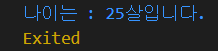
  print('나이는 : ${userData.getAge}살입니다.');
}
class UserData {
  String id;
  DateTime birth;
  String email;
  DateTime lastLoginDate;
  String name;
  String phoneNumber;

  updateUserName(String name) {    //이름업데이트함수
    this.name = name;
  }

  UserData({
    required this.id,
    required this.birth,
    required this.email,
    required this.lastLoginDate,
    required this.name,
    required this.phoneNumber,
  });
}

void main(List<String> arguments) {
  UserData userData = UserData(
      id: "id",
      birth: DateTime.now(),
      email: "[email protected]",
      lastLoginDate: DateTime.now(),
      name: "스나이퍼",
      phoneNumber: '01023456789');

  print('업데이트 전 : ${userData.name}');
  userData.updateUserName('팩토리');          //업데이트
  print('업데이트 후 : ${userData.name}');
}
